Instagram Graph API Guide 2026: Access, Auth, Publishing, Limits
How the Instagram Graph API works in 2026: which accounts can post, Instagram Login vs Facebook Login, App Review, the container publish flow, media specs, and the 100-post daily cap.

TLDR: Instagram has a publishing API, but only for Business and Creator accounts. You pick one of two login providers (Instagram Login or Facebook Login), request the instagram_business_content_publish permission, and pass App Review plus Business Verification to publish for accounts you don’t own. Publishing is a two-step container flow: create a container from a public media URL, poll until it is FINISHED, then publish. Images must be JPEG, 8 MB or less, between 4:5 and 1.91:1. Reels run 3 seconds to 15 minutes at 300 MB or less. The account-level cap is 100 API-published posts per rolling 24 hours. We publish to Instagram for PostZen’s users every day; this guide is what we wish the docs had said up front. Checked against Meta’s documentation on September 3, 2026.
Does Instagram have an API for posting?
Yes, the Instagram Platform exposes publishing, comments, insights, and messaging for Instagram professional accounts, which means Business or Creator accounts. Personal accounts cannot publish through the API at all.
Two dates matter for anyone reading older tutorials:
- December 4, 2024: the Instagram Basic Display API, which let consumer apps read a personal account’s media, was shut down. There is no replacement for personal accounts.
- January 27, 2025: the permission names for the Instagram Login changed. The publish permission is now
instagram_business_content_publish; the olderbusiness_content_publishandinstagram_content_publishnames you will see in 2023-era code are deprecated.
The API is versioned with the rest of the Graph API. As of September 2026 the current version is v26.0, released July 29, 2026. Pin a version in your base URL and read the changelog when you bump it.
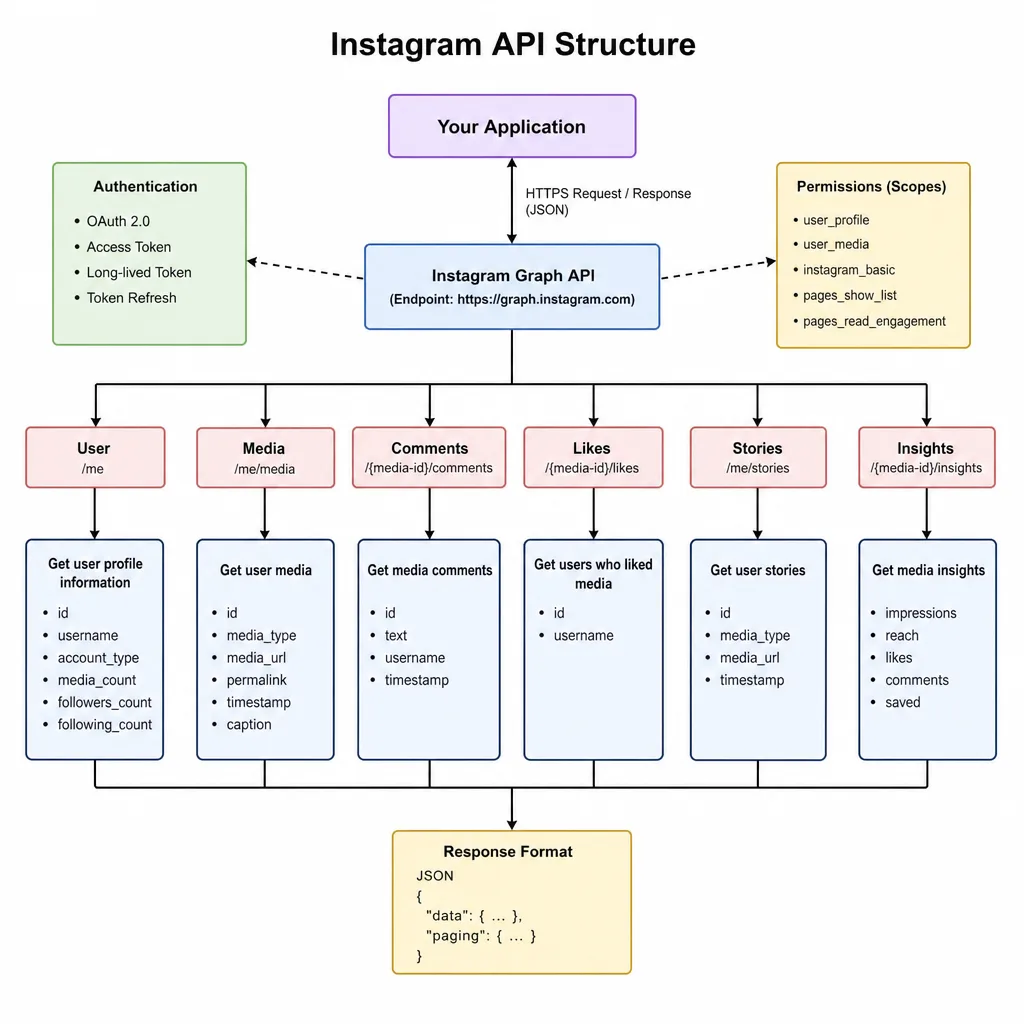
Instagram Login or Facebook Login: which one do you need?
Meta ships the same publishing surface behind two authentication products, and the choice affects your hostnames, your permission names, and what your users must have set up.
| Instagram API with Instagram Login | Instagram API with Facebook Login | |
|---|---|---|
| Base host | graph.instagram.com |
graph.facebook.com |
| Publish permission | instagram_business_content_publish |
instagram_content_publish |
| Base permission | instagram_business_basic |
instagram_basic plus pages_show_list, pages_read_engagement |
| Comments and messages | instagram_business_manage_comments, instagram_business_manage_messages |
instagram_manage_comments, instagram_manage_messages |
| Facebook Page required? | No | Yes, the Instagram account must be connected to a Page |
| User signs in with | Their Instagram credentials | Their Facebook credentials |
Instagram Login is the simpler path for a product whose users think in terms of their Instagram account and may not have, or want, a Facebook Page. Facebook Login is the right choice if you already manage Pages, need Page-level features, or run ads. Both share the same token model and the same publishing endpoints; only the host and scope names differ. The Instagram API with Instagram Login page is the reference for the newer flavour.
Everything below uses Instagram Login. Swap the host and scope names if you take the Facebook Login route.
How do you get access to the Instagram API?
- Create a Meta app at developers.facebook.com and add the Instagram product.
- Add the permissions your app needs. For publishing, That’s
instagram_business_basicandinstagram_business_content_publish. At this point your app has Standard Access: the permissions work, but only for people who hold a role on the app (admin, developer, or tester). That’s enough to build and test against your own accounts. - Submit for App Review to get Advanced Access, which is what you need to publish for Instagram accounts you don’t own or manage. Meta’s App Review guide is explicit that reviewers will log into your app and test every permission you request, and that if they cannot access it, “your entire submission will be rejected.” Your submission must include screen recordings showing the full user journey for each permission.
- Complete Business Verification. Advanced Access to these permissions requires it. Have your legal entity documents ready; this is a separate queue from App Review.
Meta publishes no turnaround time for review. In our experience the fastest rejections come from reviewers being unable to reach or sign into the app, which is the same failure mode we documented for TikTok’s review: firewalls and bot protection that treat reviewers as attackers. Make sure a reviewer with a fresh account can get from your login page to a published test post without talking to you.
How does Instagram API authentication work?
Authentication is OAuth 2.0 with a twist: tokens come in two lifetimes.
- Your user authorizes your app and Instagram redirects back with an authorization code, valid for one hour.
- You exchange the code for a short-lived access token, also valid for one hour.
- You exchange the short-lived token for a long-lived token, valid for 60 days.
- You refresh the long-lived token before it expires. The Business Login documentation requires the token to be at least 24 hours old and still valid; a token that expires unrefreshed cannot be recovered, and the user must log in again.
The exchange and refresh calls are simple GET requests against graph.instagram.com:
const IG = 'https://graph.instagram.com'

export async function toLongLivedToken(shortLivedToken, appSecret) {
	const url = new URL(`${IG}/access_token`)
	url.searchParams.set('grant_type', 'ig_exchange_token')
	url.searchParams.set('client_secret', appSecret)
	url.searchParams.set('access_token', shortLivedToken)
	const response = await fetch(url)
	if (!response.ok) throw new Error(await response.text())
	const data = await response.json()
	// data.expires_in is in seconds; 60 days is 5184000
	return { accessToken: data.access_token, expiresAt: Date.now() + data.expires_in * 1000 }
}

export async function refreshLongLivedToken(longLivedToken) {
	const url = new URL(`${IG}/refresh_access_token`)
	url.searchParams.set('grant_type', 'ig_refresh_token')
	url.searchParams.set('access_token', longLivedToken)
	const response = await fetch(url)
	if (!response.ok) throw new Error(await response.text())
	return response.json()
}
The same two calls in Python:
import requests

IG = 'https://graph.instagram.com'

def to_long_lived_token(short_lived_token: str, app_secret: str) -> dict:
    response = requests.get(
        f'{IG}/access_token',
        params={
            'grant_type': 'ig_exchange_token',
            'client_secret': app_secret,
            'access_token': short_lived_token,
        },
        timeout=30,
    )
    response.raise_for_status()
    return response.json()  # access_token, token_type, expires_in (seconds)

def refresh_long_lived_token(long_lived_token: str) -> dict:
    response = requests.get(
        f'{IG}/refresh_access_token',
        params={'grant_type': 'ig_refresh_token', 'access_token': long_lived_token},
        timeout=30,
    )
    response.raise_for_status()
    return response.json()
Run both server-side; the app secret must never ship to a browser or mobile app. In production you need a scheduled job that refreshes every token somewhere between day 1 and day 59, and a “reconnect your Instagram account” prompt for the tokens you miss. A user who changes their Instagram password invalidates the token early, so treat error 190 as a reconnect signal, not a bug.
How do you publish a post with the Instagram Graph API?
Publishing is never a single request. The content publishing guide describes a container model:
- Create a media container with
POST /{ig-user-id}/media, pointing at a media file on a public URL. Instagram fetches the file; it does not accept uploads in the request body. - Poll the container’s
status_codewithGET /{container-id}?fields=status_codeuntil it isFINISHED. Images are usually ready immediately; reels take longer. Meta recommends polling once per minute for no more than five minutes. - Publish with
POST /{ig-user-id}/media_publish?creation_id={container-id}. The response is the published media ID.
A container that is not published within 24 hours moves to EXPIRED and has to be recreated. The full set of status values is IN_PROGRESS, FINISHED, PUBLISHED, ERROR, and EXPIRED.
Container parameters that matter
| Parameter | What it does |
|---|---|
image_url or video_url |
Public URL of the media. Required for every non-carousel container. |
media_type |
Omit for a single image. REELS for a video, STORIES for a story, CAROUSEL for the parent carousel container. |
caption |
Up to 2,200 characters, 30 hashtags, and 20 @ mentions. Not accepted on carousel child items; set it on the parent. |
is_carousel_item |
true on each child container of a carousel. |
children |
Comma-separated child container IDs on the carousel parent, up to 10. |
share_to_feed |
Reels only. true shows the reel in both Feed and the Reels tab; false keeps it in Reels only. |
cover_url / thumb_offset |
Reels only. A cover image URL, or the millisecond offset of the frame to use as the thumbnail. |
user_tags |
Public usernames with x/y coordinates for feed images. Not supported on carousels. |
location_id |
The ID of a Facebook Page that represents a location. Not supported on carousel items. |
Stories take no caption; Instagram never displays one.
Publishing an image in Node
const IG = 'https://graph.instagram.com/v26.0'

async function post(path, params, token) {
	const body = new URLSearchParams({ ...params, access_token: token })
	const response = await fetch(`${IG}${path}`, { method: 'POST', body })
	const data = await response.json()
	if (!response.ok || data.error) throw new Error(JSON.stringify(data.error ?? data))
	return data
}

async function waitUntilFinished(containerId, token) {
	for (let attempt = 0; attempt < 5; attempt++) {
		const url = `${IG}/${containerId}?fields=status_code&access_token=${token}`
		const { status_code } = await (await fetch(url)).json()
		if (status_code === 'FINISHED') return
		if (status_code === 'ERROR' || status_code === 'EXPIRED') throw new Error(`container ${status_code}`)
		await new Promise((resolve) => setTimeout(resolve, 60_000))
	}
	throw new Error('container not ready after 5 minutes')
}

export async function publishImage({ igUserId, token, imageUrl, caption }) {
	const { id: containerId } = await post(`/${igUserId}/media`, { image_url: imageUrl, caption }, token)
	await waitUntilFinished(containerId, token)
	const { id: mediaId } = await post(`/${igUserId}/media_publish`, { creation_id: containerId }, token)
	return mediaId
}
Publishing a reel in Python
import time
import requests

IG = 'https://graph.instagram.com/v26.0'

def _post(path: str, params: dict, token: str) -> dict:
    response = requests.post(f'{IG}{path}', data={**params, 'access_token': token}, timeout=30)
    data = response.json()
    if not response.ok or 'error' in data:
        raise RuntimeError(data.get('error', data))
    return data

def _wait_until_finished(container_id: str, token: str) -> None:
    for _ in range(5):
        status = requests.get(
            f'{IG}/{container_id}',
            params={'fields': 'status_code', 'access_token': token},
            timeout=30,
        ).json().get('status_code')
        if status == 'FINISHED':
            return
        if status in ('ERROR', 'EXPIRED'):
            raise RuntimeError(f'container {status}')
        time.sleep(60)
    raise RuntimeError('container not ready after 5 minutes')

def publish_reel(ig_user_id: str, token: str, video_url: str, caption: str, share_to_feed: bool = True) -> str:
    container = _post(
        f'/{ig_user_id}/media',
        {
            'media_type': 'REELS',
            'video_url': video_url,
            'caption': caption,
            'share_to_feed': 'true' if share_to_feed else 'false',
        },
        token,
    )
    _wait_until_finished(container['id'], token)
    published = _post(f'/{ig_user_id}/media_publish', {'creation_id': container['id']}, token)
    return published['id']
A carousel is the same pattern applied twice: create each child with is_carousel_item=true, wait for all of them, create the parent with media_type=CAROUSEL and children=id1,id2,..., wait again, then publish the parent.
What are the Instagram API media requirements?
Meta’s media reference is where most first attempts fail. The rules as of September 2026:
| Feed image | Reel | Story | Carousel | |
|---|---|---|---|---|
| Format | JPEG only (no MPO or JPS) | MOV or MP4 | JPEG image, or MOV/MP4 video | Same rules per item |
| Max size | 8 MB | 300 MB | 8 MB image, 100 MB video | Per item |
| Aspect ratio | 4:5 to 1.91:1 | 9:16 recommended | 9:16 recommended | All items cropped to the first item’s ratio (default 1:1) |
| Dimensions | 320 to 1440 px wide | |||
| Duration | 3 s to 15 min | 3 s to 60 s (video) | Per item | |
| Video specs | 23 to 60 fps, 25 Mbps max | |||
| Count | 1 | 1 | 1 | 2 to 10, images and videos mixed |
Three rules cause the most support tickets:
- The URL must be public and fast. Instagram’s fetcher downloads the file when you create the container. A signed URL that expires in 60 seconds, a URL behind authentication, or an origin that blocks datacenter IPs produces error 9004 (“The media could not be fetched from this uri”). Slow origins produce subcode 2207003 (“It takes too long to download the media”).
- JPEG means JPEG. PNG and WebP are rejected. Transcode before you publish.
- Carousels crop to the first item. If item one is 4:5 and item three is 1.91:1, item three is cropped to 4:5. Normalise your ratios before creating the children.
What are the Instagram API rate limits?
There are two separate limits, and they are measured differently.
Publishing quota. The content publishing guide states that an account can make 100 API-published posts within a rolling 24-hour period, and a carousel counts as one post. Meta’s own reference for the content_publishing_limit endpoint still says quota_total is “currently 50” in its description text, so the two pages disagree. Do not hard-code either number. Call the endpoint:
GET /{ig-user-id}/content_publishing_limit?fields=quota_usage,configquota_usage is how many containers the account has published in the current window; config.quota_total and config.quota_duration (86,400 seconds) give you the live ceiling.
Call-volume limit. Every Graph API call also counts against the Business Use Case rate limit. For Instagram the formula is 4800 × impressions, where impressions is the number of times the account’s content appeared on screen in the last 24 hours. A brand-new account with no audience therefore has a very small call budget. Each response carries an X-Business-Use-Case-Usage header with call_count, total_cputime, and total_time as percentages, and estimated_time_to_regain_access in minutes when you are throttled. Log that header; it tells you when to back off before the API tells you with error 4 or 17.
What analytics does the Instagram API expose?
Insights are available through the same token if you request instagram_business_manage_insights (Instagram Login) or instagram_manage_insights (Facebook Login).
Per post: GET /{media-id}/insights returns views, reach, likes, comments, saved, shares, reposts, total_interactions, follows, profile_visits, profile_activity, and, for reels, ig_reels_avg_watch_time and ig_reels_video_view_total_time. The impressions metric is deprecated for media created after July 2, 2024; views replaces it. Reference: media insights.
Per account: GET /{ig-user-id}/insights returns reach, views, accounts_engaged, total_interactions, likes, comments, saves, shares, follows_and_unfollows, profile_links_taps, and follower_demographics. Account-level impressions was deprecated in v22.0 and removed for all versions on April 21, 2025. Reference: user insights.
If your product shows a number labelled “impressions” for Instagram, it is either stale or computed from views. Rename it.
Instagram API error codes you will actually see
Meta’s Instagram error reference is long; these are the ones that show up in publishing logs.
| Code / subcode | Message | Fix |
|---|---|---|
| 9004 / 2207052 | The media could not be fetched from this URI | Make the URL public, fast, and long-lived; check that your CDN does not block Meta’s fetcher |
| 36003 / 2207009 | The submitted image with aspect ratio X cannot be published | Crop to between 4:5 and 1.91:1 |
| 352 / 2207026 | The video format is not supported | Re-encode as MP4 or MOV, H.264, within the reel specs |
| -2 / 2207003 | It takes too long to download the media | Serve from a faster origin or a CDN; reduce file size |
| -2 / 2207020 | The media you are trying to access has expired | The container passed 24 hours; create a new one |
| 9007 / 2207027 | The media is not ready for publishing | Poll status_code until FINISHED before calling media_publish |
| 4 / 2207051 | We restrict certain activity to protect our community | Publishing looked automated or spammy; slow down and vary content |
| 190 | Access token has expired | Refresh, or send the user through login again |
| 10 | Permission is either not granted or has been removed | Re-request the scope; check Advanced Access status |
| 4, 17 | Temporary issue due to throttling | Back off using estimated_time_to_regain_access |
Log the error_subcode and error_user_msg fields, not just the top-level code. Code 4 alone is ambiguous; the subcode tells you whether it is throttling or spam detection.
Using the Instagram API from Python: official only
Search for “Instagram API Python” and the first results are unofficial libraries that drive Instagram’s private mobile API with a username and password. They work until they don’t: Instagram challenges the login, asks for verification, then restricts or bans the account. They also violate Instagram’s terms, so a product built on them has no recourse when it breaks.
The official path in Python is nothing more than the requests calls above: exchange tokens, create a container, poll, publish. There is no official Python SDK for the Instagram API, and you don’t need one. If you want a typed client, use a generic Graph API wrapper or a unified API’s SDK.
The shorter path: one request instead of a container flow
If Instagram is one of several networks you publish to, you are about to write the container flow, the polling loop, the token refresher, the media transcoder, and the reconnect prompt, then repeat most of it for LinkedIn, TikTok, and the rest. That is the integration cost we built PostZen to remove. One request creates a carousel on Instagram; the same request shape publishes to nine other networks, and PostZen handles OAuth, token refresh, media hosting at public URLs, the container polling, and the quota checks.
curl -X POST https://api.postzen.dev/v1/posts \
  -H "Authorization: Bearer pzn_live_..." \
  -H "Content-Type: application/json" \
  -d '{
    "content": "Three views of the new release.",
    "publishNow": true,
    "mediaItems": [
      { "url": "https://cdn.example.com/release-1.jpg" },
      { "url": "https://cdn.example.com/release-2.mp4" },
      { "url": "https://cdn.example.com/release-3.jpg" }
    ],
    "platforms": [
      {
        "platform": "instagram",
        "accountId": "17841400000000000",
        "settings": { "postType": "carousel" }
      }
    ]
  }'
postType accepts feed, carousel, reel, and story, and PostZen validates the media against Instagram’s rules before it touches Meta’s API, so an aspect-ratio or format mistake comes back as a readable validation error instead of a 36003 after a minute of polling. Instagram’s own limits still apply; a unified API does not raise the 100-post ceiling or bypass App Review, because the review was done once, by us. Details are in the Instagram integration docs, the Instagram page, and the broader social media API overview. For how Instagram compares with the other nine networks on access, limits, and pricing, see the best social media APIs for developers.
Frequently asked questions
Does Instagram have a public API for posting?
Yes. The Instagram API (part of the Meta Graph API) lets Business and Creator accounts publish images, carousels, reels, and stories. Personal accounts cannot use it, and the old Basic Display API was shut down on December 4, 2024.
Is the Instagram Graph API free?
Meta documents no fee for the API itself. The costs are indirect: App Review and Business Verification for Advanced Access, hosting media at public URLs, and the engineering time to maintain the integration.
How many posts can I publish through the Instagram API per day?
The content publishing guide states 100 API-published posts per rolling 24 hours per account, with a carousel counting as one. Check the content_publishing_limit endpoint for the live quota, because parts of the reference still quote 50.
What is the difference between Instagram Login and Facebook Login for the API?
Instagram Login talks to graph.instagram.com, uses instagram_business_* permissions, and needs no Facebook Page. Facebook Login talks to graph.facebook.com, uses instagram_* plus pages_* permissions, and requires the Instagram account to be connected to a Facebook Page.
Can I post to Instagram from Python?
Yes, with plain HTTP requests against the Graph API: create a media container, poll its status, then publish it. Avoid unofficial libraries that drive the private mobile API; they violate the terms and get accounts challenged or banned.
Why does my Instagram API post fail with an aspect ratio error?
Feed images must fall between 4:5 and 1.91:1. Error 36003 with subcode 2207009 means the image is outside that range; crop it before creating the container. Reels and stories are 9:16.